eero PoE 6
The eero PoE 6 is eero’s first ceiling/wall-mountable Wi-Fi 6 access point, capable of providing up to 2,000 square feet of coverage with the ability to support 100+ devices. Designed to be mountable on virtually any surface where Ethernet cables can be pulled, it can be easily flush mounted to walls and ceilings to provide optimal wifi coverage.
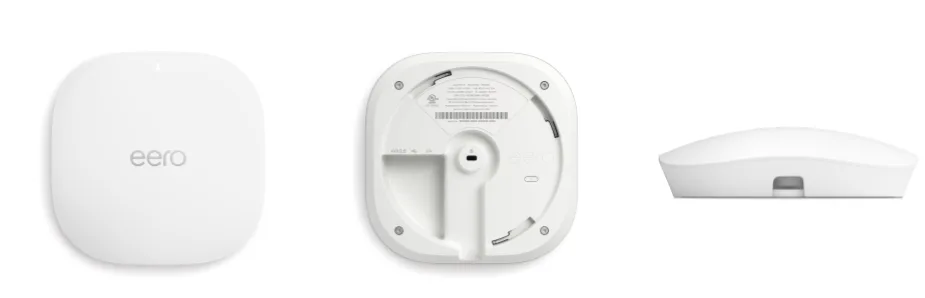
Because the eero PoE 6 utilizes PoE (Power over Ethernet), it doesn’t require the use of a separate power supply. This makes it even easier to mount the device on high surfaces.
What is eero PoE 6?
The eero PoE 6 is a dual-band Wi-Fi 6 router that can also double as an access point for a larger network, and can function either wirelessly, or wired via traditional or PoE-enabled Ethernet. Featuring all the functionality of other eeros, it can be used on its own, or in conjunction with the eero PoE Gateway as part of a completely PoE-optimized network.
Features:
Full support for Wi-Fi 6 (IEEE 802.11a/b/g/n/ac/ax)
Supports PoE, eliminating the need for power adapters
Supports wireless speeds up to 1.6 Gbps
AX3000 rating
2x2 Antenna Array
Automatic Channel Selection
Works With Alexa
Zigbee-compatible smart home hub
Thread compatible
Matter compatible
Supports Smart Home Hub (SHH)
Hardware Specifications
Device Name | eero PoE 6 |
|---|---|
Use Case | Wired or wireless access point |
Placement | Ceiling/wall mounted |
Size | 6.45 x 6.45 x 1.7 in (163.8 x 163.8 x 43 mm) |
Connectivity | Dual-Band 2x2/2x2 SU-MIMO 2.4 GHz: 2x2 5 GHz: 2x2 1 auto-sensing 2.5 GbE port 1 auto-sensing 1 GbE port |
Channel Width | 20, 40, 80, 160 MHz |
Power | Power over Ethernet (802.3af) or 15W external USB-PD |
What’s in the box?
For eero PoE 6 devices that are sold individually, each package contains the following:
1 eero PoE 6
1 mounting bracket
Mounting accessories
To set up the eero PoE 6, visit our eero PoE 6 Setup guide.
Frequently Asked Questions
