Botnet detection and prevention for every eero network
Jul 14, 2026Your wifi network is more than speed and coverage—it's the front door to your digital life. Everything from work calls to security cameras, baby monitors, and smart lights depends on it. But some devices on your network may sit quietly in the background for years, rarely, if ever, receiving software updates. Many can't run antivirus software.
That’s why we’re adding a new layer of protection to eero networks, rolling out across the entire eero fleet in the coming weeks: botnet detection and prevention, to help protect the devices you don’t always think about.
A botnet is a group of internet-connected devices that have been quietly taken over by an attacker. The device still works normally, but in the background, it's taking instructions from someone else. Attackers use botnets to flood websites with traffic, test stolen passwords, scrape data, or move deeper into networks. A compromised device looks normal from the living room while behaving very differently on the internet.
This new layer of protection leverages AWS’s active threat defense capabilities, which use Amazon threat intelligence from MadPot, an internal AWS threat intelligence and disruption service. It identifies devices that attempt to communicate with known malicious internet infrastructure, such as command-and-control servers or other suspicious IP addresses, and blocks that communication.
Starting later this quarter, when we identify that kind of activity, we’ll also let customers know which devices have been impacted in the eero app. Customers can temporarily pause internet access for affected devices while they power cycle them, install firmware updates, change credentials, or replace devices that are no longer supported.
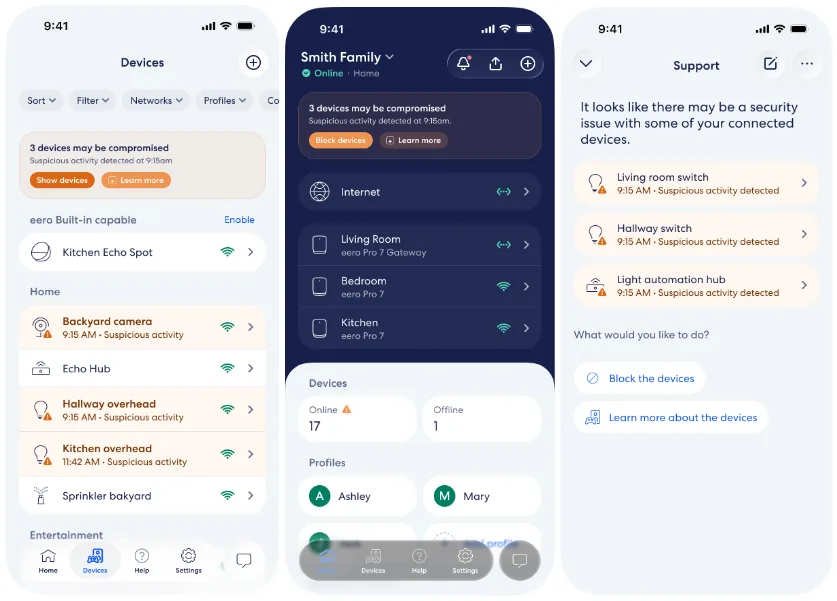
Later this quarter, the eero app will highlight devices on your network that may be comprised and offer steps on how to mitigate the issue.
This feature is the latest example of a principle that has guided eero since it was founded in a San Francisco apartment in 2014: customers shouldn’t have to be networking experts to stay safe. Security should be built in, updated automatically, and always working in the background.
More ways eero keeps you safe
Security starts long before your eero ever reaches your home or business
Security doesn’t begin when you plug in your eero—it starts during manufacturing. Every eero is manufactured in a tightly controlled environment designed to prevent tampering at any point in the production process.
Each eero contains a hardware root of trust: a small set of security instructions built directly into the chipset that defines what software the device is allowed to run. Those instructions can’t be changed and are protected by dedicated security hardware in the eero. One of the most important rules is simple: only run software that eero HQ has approved. We enforce that using a process called signing. When we create software, a small group of senior technical staff in San Francisco approves each release. We then attach a digital seal (or signature) that proves it came from eero HQ, hasn’t been altered, and is intended for a specific eero device. Each eero checks for that seal before running anything; if it’s missing or doesn’t match, the eero device refuses to run it.

We remove common attack points
Many router security problems start with exposed entry points. Some routers include local web interfaces, open management ports, remote access tools, or older protocols that can become targets if they are misconfigured, outdated, or vulnerable. eero takes a different approach. No default-credential web interfaces. No plaintext credential transmission. No SSH or telnet access. No open WAN-facing management ports. All communication between eero devices and eero’s cloud services is encrypted. That may sound technical, but the idea is straightforward: if an attacker has fewer ways to reach the system, there are fewer ways to attack it.
Your network updates automatically
Security is not something you do once. It has to keep improving. That’s why eero, from the beginning, has automatically delivered software updates that fix vulnerabilities, improve performance, and add new features. Customers don’t need to download firmware, check a support page, or manually install updates. We average an app update every month and an eeroOS update every 4-6 weeks.
We monitor, test, and respond continuously
eero regularly reviews new features and software changes for security. We monitor for emerging threats. And when industry-wide vulnerabilities are discovered, our teams can move quickly because we control the full software stack. A good example is KRACK, a major Wi-Fi vulnerability disclosed in 2017. eero was able to develop, test, and automatically deploy a fix to every customer in less than a week. That kind of response is one reason automatic updates matter.
The bottom line: with eero, security is automatic and keeps improving over time through over-the-air updates. No complicated setup. No manual updates. Fewer attack surfaces. A network designed to help protect your home or business from day one.