Scheduled OTAs Blog Post Draft
Aug 26, 2026Scheduled over-the-air updates: your network updates on your time
You’re deep into movie night, the kids are finally quiet, and the last thing you want is your wifi hiccupping because your router decided now is the perfect time to update. We get it. That’s exactly why we built scheduled over-the-air (OTA) updates—so your eero network gets the latest firmware when it works for you.
Since day one, eero has delivered automatic OTA updates about once a month—keeping your network secure, adding new features, improving performance, and making sure your eero works with the latest devices in your home. It’s how every eero stays new and gets better over time. With scheduled OTA updates, we took that a step further: now every network has a preferred update window that you can set in the eero app, and the entire system, from our scheduling infrastructure to the device firmware, is designed to respect it. Here’s how it all works.
Choosing your update window
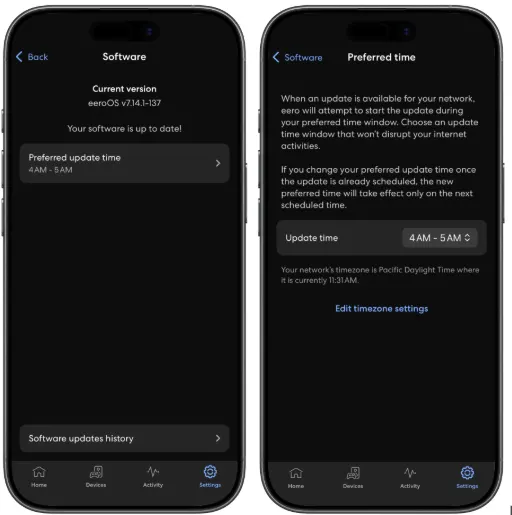
The eero app showing your preferred update time (left), and where you can change it (right).
Every eero network has a one-hour update window. By default, it’s set to 2-3 a.m. in your local time zone, when most homes are asleep and network traffic is at its lowest. You can change this anytime in the eero app to whatever hour works best for your household.
Update windows are based on your local time zone—eero detects this automatically from your network’s location. A network in New York updates during the 2-3 a.m. Eastern time window, while one in Tokyo updates 2-3 a.m. JST.
How a rollout begins
When a new firmware version is ready, we don’t push it to every network at once. New versions go through extensive internal testing first, running on eero employee and beta tester networks, often for weeks, before reaching any customer networks. During that time, we collect bug reports and ship fixes so customers get the most polished version possible. Once a version is ready for customers, our scheduling system selects a percentage of eligible customer networks each day and schedules them for their next local update window. Networks where every eero is already running the latest firmware are skipped entirely. On day one, only a small fraction of eligible networks are selected. If everything looks good, the percentage increases gradually until the rollout is complete.
This phased approach gives us time to catch problems early. If a firmware version has an issue that only surfaces under certain conditions, we’ll see it in the first wave of updates before it reaches the rest. And if something does go wrong, we can cancel the rollout, release a hotfix, and reschedule networks for that version instead.
Heads up: notifications before the update
Nobody likes surprises when it comes to their internet. Scheduled updates come with two push notifications:
12 hours before: A heads-up that an update is on the way, including the firmware version and your update window. For example, “Your home network will be updated between 2:00 a.m. and 3:00 a.m.”
15 minutes before: A final reminder that the update is about to begin.
Like any other eero push notification, you can enable or disable them in the eero app—or skip the wait entirely and update on demand.
Staggering within the window
Even within a single day’s batch, we don’t schedule every network for the exact same minute. When our cloud calculates each network’s update time, it spreads them across the entire hour with random offsets. The result: networks trickle in steadily rather than arriving in a stampede. This keeps our update infrastructure running smoothly and means your network isn’t competing with thousands of others for resources at the same instant.
What happens when an update gets scheduled?
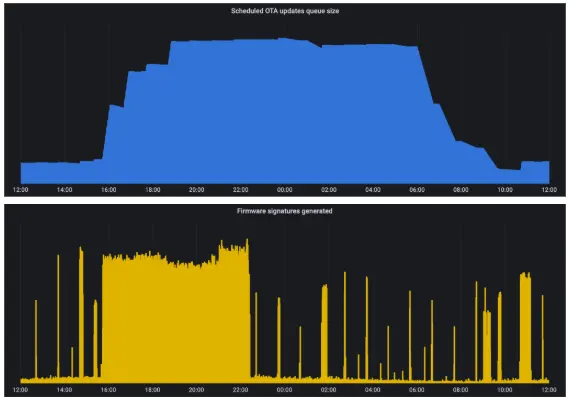
A 24-hour view of a typical rollout day, showing updates queuing up (top) and signatures being generated ahead of time (bottom).
When your network gets scheduled for an update, our cloud kicks off a multistep process that coordinates between our servers and the eeros in your home.
First, our cloud generates cryptographic signatures for the firmware. Each update image, including the bootloader, kernel, and filesystem, is signed uniquely for each individual eero. Devices with secure boot (eero 6 and later) won’t install anything without verifying these signatures. To keep things fast, we actually do this heavy lifting ahead of time: in the hours before your update window, the system pregenerates signatures so everything is ready to go the moment the timer fires.
Once the update begins, each eero in your network is instructed to download the new firmware. The device downloads the firmware image and verifies its checksum to ensure nothing was corrupted in transit. It then decompresses the image, and writes the new software and its secure boot signatures to an alternate partition—a separate copy of the operating system that every eero maintains for exactly this purpose. The currently running software is never overwritten, so if anything goes wrong, the device can fall back to the version it was running before.
After the new firmware is written, the device toggles its boot configuration to point to the new partition and reboots. During boot, each layer—hardware, bootloader, kernel, and filesystem—verifies the next in a chain of trust. The hardware checks the bootloader’s cryptographic signature, the bootloader checks the kernel’s, and the kernel uses dm-verity to verify every block of the filesystem as it’s read, ensuring that nothing has been tampered with between the time the update was written and the moment it runs. When the device comes back online and successfully connects to our cloud, the update is marked complete. If the boot fails for any reason, the device automatically falls back to the previous partition without any manual intervention.
The entire process is designed so that your network is offline for the shortest possible time: just during the reboot itself.
Cancellation and safety nets
If we detect an issue with a firmware version, we act immediately. Scheduled updates for the affected version can be canceled at any time, and any networks that were already scheduled are taken off the list. No updates go out that shouldn’t.
There’s also a built-in grace period: if a network misses its exact scheduled time (maybe it was briefly offline), the system will still attempt the update within 15 minutes. After that, the update is considered missed. But the network isn’t forgotten: it goes back into the eligible pool and will be selected again in a future rollout cycle.
Why this matters
Your eero network is the backbone of your connected home. Every smart lock, security camera, video call, and streaming session depends on it. Scheduled OTA updates mean your network keeps getting better—with the latest security patches, performance improvements, and new features—without ever getting in the way of your daily life.
It’s the kind of thing you shouldn’t have to think about. And that’s exactly the point.
For more information about OTA updates and instructions for turning on update notifications, visit our support center.
Interested in building systems like this? Check out our careers page.
— Written by Burak Varan (Software Engineer on the eero Core Cloud team – Los Gatos, California).